THE GROWTH PROTOCOL · START HERE
Your guide to GP Alpha
Understand the outlook. Review your holdings. Know what to watch next.
Start with the daily routine ↓Pictures are examples captured September 8, 2026. Quotes, returns and status messages change. Check the current app before using a signal.
1. Start with Today
I built GP Alpha to bring market conditions, portfolio research and holding signals into one place. The goal is to help you understand what matters, what has changed and what deserves your attention.
Open Today in the bottom navigation. Start with the three cards under Today at a glance: Stocks, Bitcoin and Ethereum. Each has its own assessment. They can point in different directions.
Read each card in this order: - Status: How does the model describe conditions? - Explanation: What does that assessment mean? - What changed: Is there a meaningful difference from the previous reading? - Watch next: What evidence could change the outlook? - Time: When was the assessment updated?
A supportive stock-market outlook describes the broader environment. It does not mean every stock is an attractive purchase. Use it as context before reviewing an individual holding.
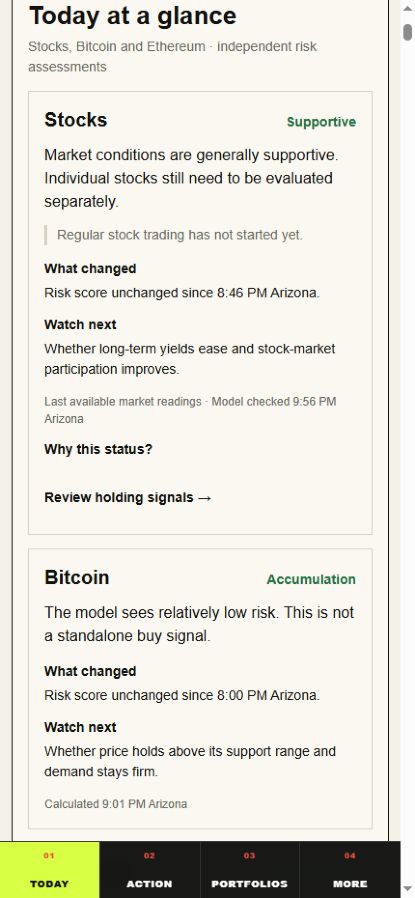
2. Understand the colors and risk scores
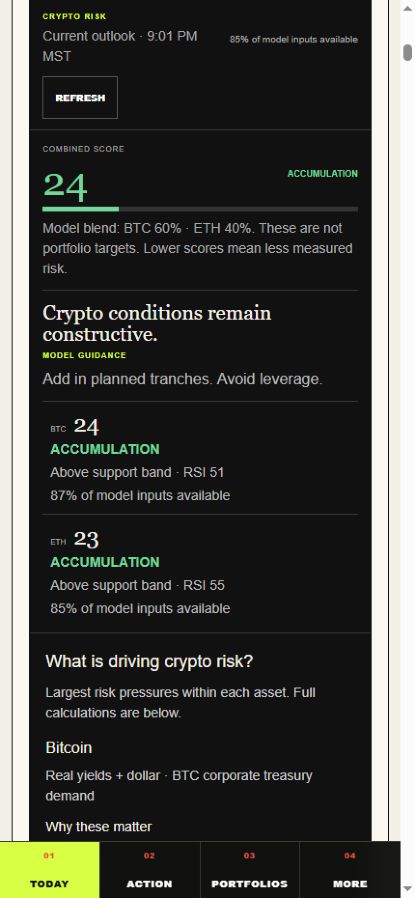
Green identifies more supportive assessments, including Constructive and Accumulation. Yellow identifies caution or a more defensive assessment. Red identifies elevated risk. Gray indicates an assessment or input is unavailable. Always read the label beside the color.
Accumulation means the crypto model sees relatively low measured risk. It is not an automatic instruction to buy. Constructive means conditions are generally supportive. Neutral means the evidence is mixed. Defensive and High risk call for closer attention to exposure and the factors driving the reading.
Open Stock risk score and market signals or Bitcoin and Ethereum risk scores when you want the evidence behind the summary. Lower risk scores mean less measured risk within that model. A score of 24 does not mean a 24% chance of loss or a 24% expected return.
The crypto monitor combines Bitcoin and Ethereum at a 60/40 model blend. Those percentages are not portfolio target weights. Read each asset’s separate score and explanation as well.
Use the drivers and evidence details to understand why a reading changed. A favorable score is most useful when you also understand what could weaken it.
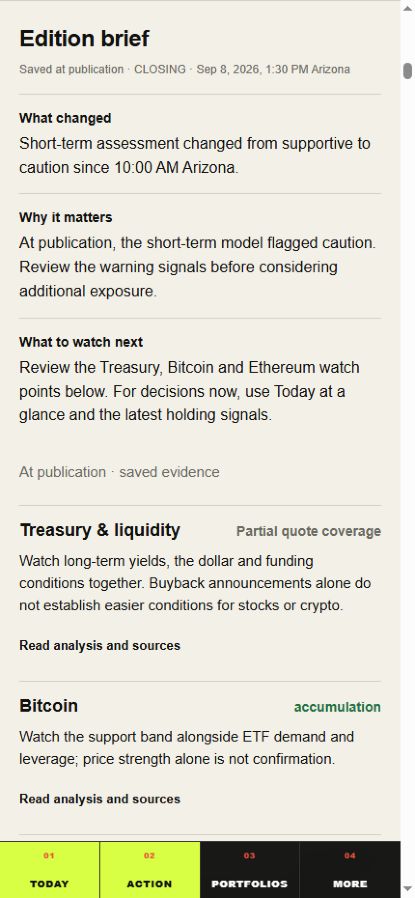
3. Read the edition brief for context
The edition brief adds the explanation behind the numbers. Start with Since the previous edition, then read the current outlook and the supporting Treasury, Bitcoin and Ethereum context.
For Treasury and liquidity, look for what changed in funding conditions and why it matters. For crypto, distinguish technical evidence, such as price trends and support, from fundamental evidence, such as ETF demand. Open the evidence and timing details when you want to inspect the sources.
Editions are scheduled for 6:00 AM, 8:00 AM, 10:00 AM and 1:30 PM Arizona time. Check the saved edition’s timestamp. The live monitor and the editorial edition update on different schedules, so a refreshed quote does not mean a new brief has been published.
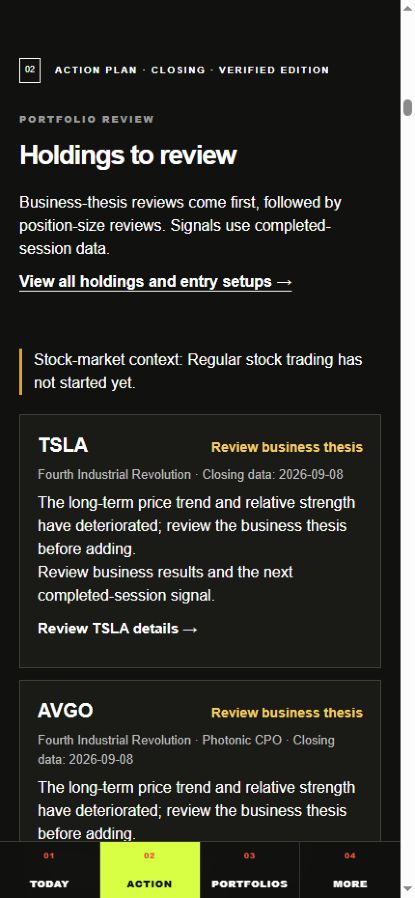
4. Use Action to focus your review
Tap Action to find Holdings to review. This is a practical starting point when you do not want to read every portfolio from top to bottom.
- Review business thesis: The signal has identified deterioration worth investigating. Read the company’s results and research; the label alone does not prove the business thesis has failed.
- Review position size: Reassess how much exposure you have in light of the signal and your plan.
- Potential entry: Review the reference price and next step. When trading is closed, review next session. Watchlist only means market caution is active; awaiting confirmation means current market evidence is needed. Check price means market conditions permit selective additions, but the stock still needs a suitable entry.
- Hold · monitor: Continue watching the position and the next signal.
Select Review [ticker] details to see the holding in context. Holding signals use completed-session data, so check the closing date. They are not intraday execution alerts.
If the market is supportive while one holding needs review, that is not necessarily a contradiction. The broader market and an individual company can have different conditions.
5. Navigate directly to your portfolio
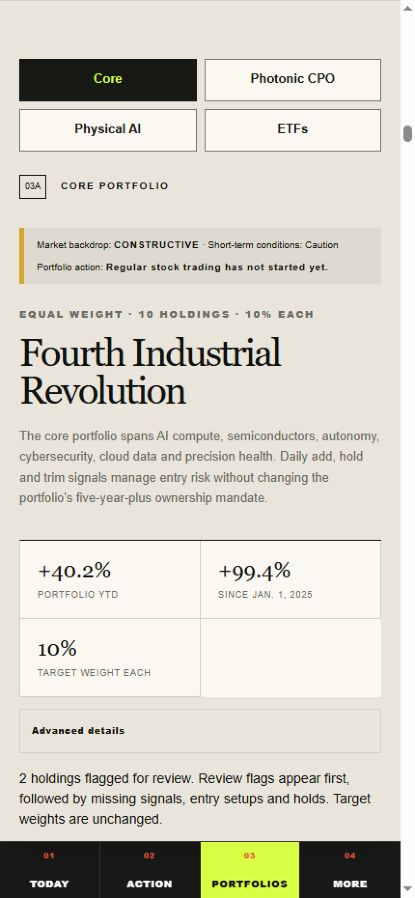
Tap Portfolios, then use Core, Photonic CPO, Physical AI or ETFs. The buttons appear at the top of each portfolio so you can move between them without scrolling through every holding.
Start with the portfolio description and target weights. Then review flagged holdings, the signal explanation and Watch next. Open Position guidance, levels and scores for more detail where available.
Read a reference entry price together with its signal. Reaching a price level alone is not confirmation that all conditions are met. Check the current market price separately before acting.
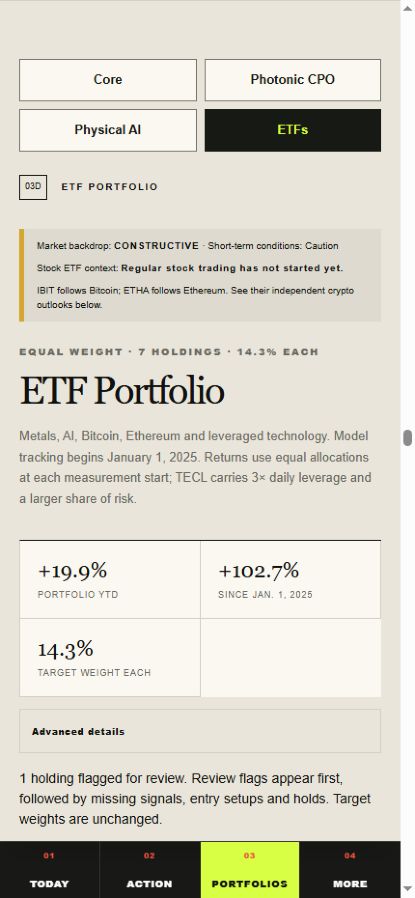
The Bitcoin and Ethereum ETFs follow their respective crypto assessments. Their ETF prices and historical returns remain separate from the underlying crypto outlook.
Use More for the app’s additional research, including the AI Infrastructure tracker. Go there when you want to investigate a company or theme beyond the daily summary.
6. Read performance in the right context
YTD measures performance from the start of the current calendar year. Since Jan. 1, 2025 measures cumulative performance from the model’s starting date. Do not add those two percentages together.
These are historical returns for today’s holdings, not an actual portfolio track record. The portfolio calculations use equal allocations at the start of each measurement period. Your purchase dates, position sizes, trades and costs can produce different results. Open Return methodology and data for the calculation details.
Equal weight means equal starting capital allocation, not equal risk. The ETF portfolio includes leveraged technology exposure, which can contribute disproportionately to gains and losses.
A holding can have a negative YTD return and a constructive current outlook. One describes past performance; the other describes the model’s present assessment.
Your daily routine
- Open Today and read the three asset outlooks.
- Check What changed and the latest edition timestamp.
- Open Action and review holdings that need attention.
- Go to the relevant portfolio for the signal, reference levels and closing date.
- Make a decision only after checking how the evidence fits your own position and plan.
You do not need to open every advanced panel on every visit. Start with the summary; inspect the details when a label changes, a holding is flagged or you are considering a trade.
If a reading is delayed or unavailable, open its data details and check the last verified observation. A page refresh is not proof that the underlying data is newer. If information is still missing, treat that assessment as incomplete.
The habit I want readers to build is simple: understand the backdrop, review the holding and know what would change your view.
Open GP Alpha →